AI Feature Consulting Agent
Your AI-Powered Teams PM Assistant
Copilot Studio · Teams SaaS
CLI Mode · Claude Opus 4.6 + MCP
LLM Mode · GPT-5.4 Web UI
365Q&A Records
12Feature Areas
68%Troubleshooting
4Channels
liuhanlin | Mentor: Fei Zuo | FY26 Vendor Student Program | Microsoft Teams CMD
The Problem — Why We Built This
Teams PM team (CMD SOX) receives a high volume of feature queries daily via Chat, Email, IcM, Office Hours — covering transcription, recording, Copilot, Graph API, compliance policies, and more.
PM Pain Points
Context Switching
5+ apps: Teams, Wiki, ADO, Learn, Email
Repetitive Work
Same questions re-searched and re-answered
Knowledge Loss
Quality answers scattered in chat, not reusable
Field Pain Points
Long Wait Times
Hours or even days for a PM response
Don't Know Who to Ask
Questions bounce across channels, no clear owner
Inconsistent Answers
Different PMs, different answers — no single source
365
Q&A Records
12
Feature Areas
68%
Troubleshooting
4
Consulting Channels
The Solution — Three Modes
Copilot Studio
GPT-5.4 · Teams SaaS
~15s response, zero-code deployment
1:1 direct chat in Teams
Knowledge: Docs + Web + Graph Connector
1:1 direct chat in Teams
Knowledge: Docs + Web + Graph Connector
Best for quick Field questions
Limitation: no local KB
CLI Mode
Claude Opus 4.6 · Local Terminal
MCP connection to SharePoint / Teams / Outlook
Accesses full personal KB
Deepest accuracy & retrieval
Accesses full personal KB
Deepest accuracy & retrieval
Best for complex & high-stakes questions
LLM Mode
GPT-5.4 · Web UI / API
8-step pipeline · REST API interface
Ideal for batch evaluation & CI automation
Ideal for batch evaluation & CI automation
Best for systematic testing at scale
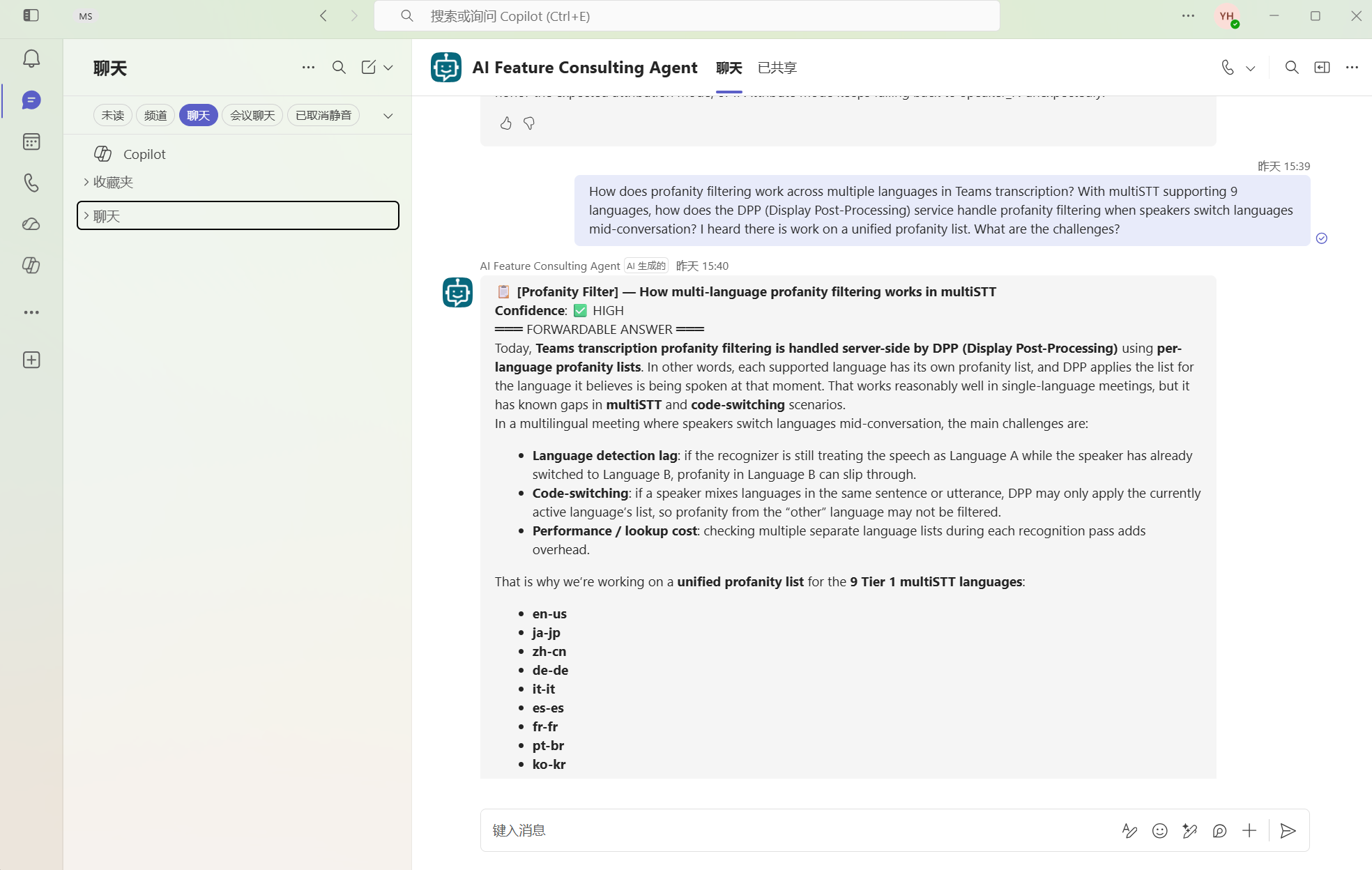
Copilot Studio Agent in Teams
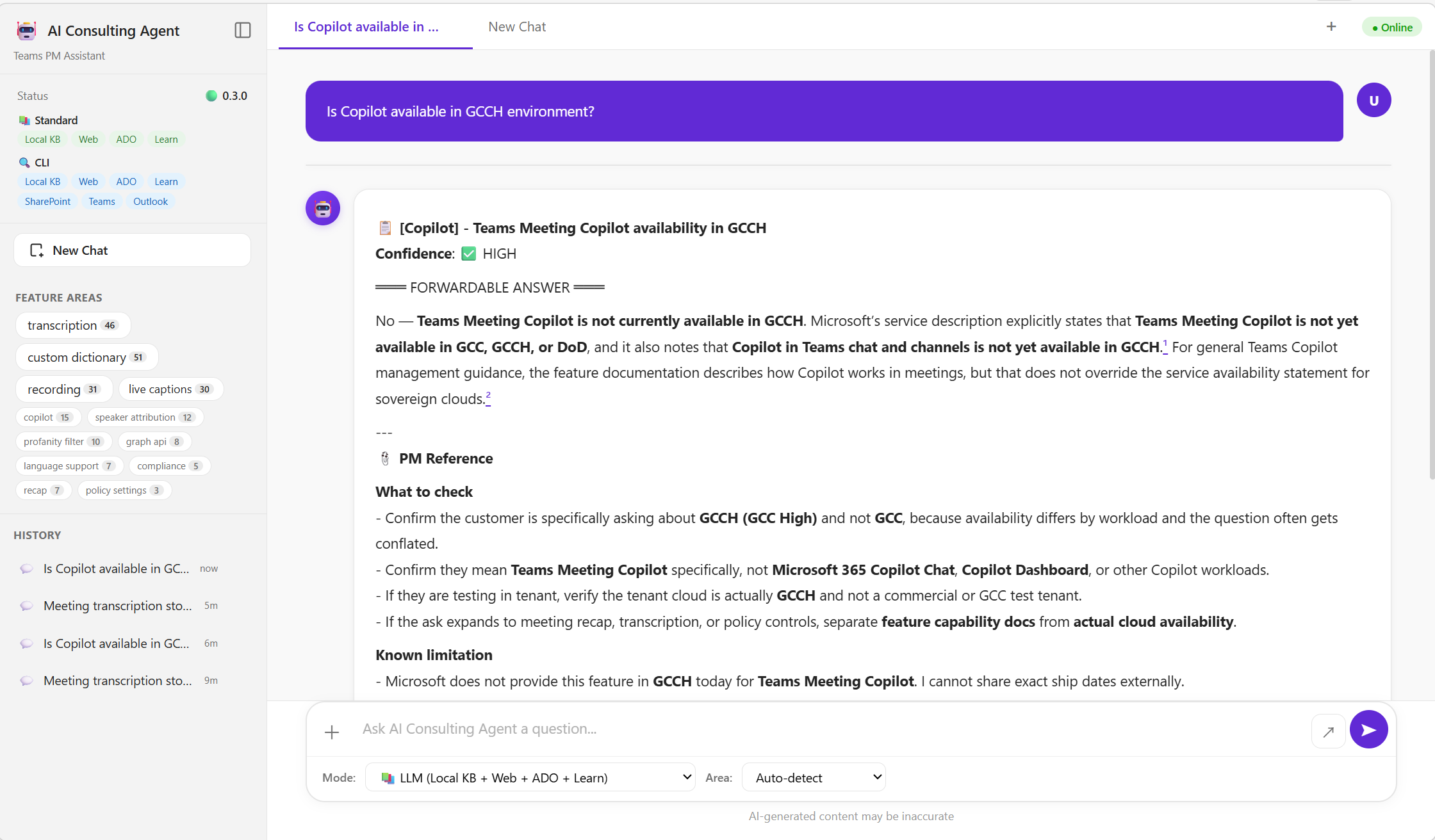
LLM Mode Web UI
How It Works — Pipeline
Input Layer
Questions from Teams Chat, Email, IcM, Office Hours — auto-classified by topic area
Knowledge Base
365 Q&A records across 12 feature areas, keyword-indexed, with gold standard PM answers for evaluation
Prompt Engineering
Structured system prompt with role definition, KB context injection, output format, and confidence calibration
Multi-Model
GPT-5.4 (Studio & LLM), Claude Opus 4.6 (CLI) — each optimized for its deployment context
Results — Evaluation Scores
🏆 Top Score — CLI Mode
4.62
surpasses Gold PM 4.58
💡 Full KB + MCP = deepest retrieval
Weighted Overall Scores
Four-Dimension Evaluation
🎯
Accuracy (40%)
Factual consistency with Gold Standard
📏
Fitness (25%)
Depth & breadth match complexity
⚡
Actionability (20%)
Actionable steps PM can use directly
🔗
Traceability (15%)
Cites KB records & documentation
Judge: Claude Opus 4.6 | 0.5 step | 20 Gold Standard
Per-Dimension Comparison
Case Studies — Comparative Analysis
💬 A customer wants to file a DCR to enable transcript download for all attendees by default. What is the DCR process?
🖥️ CLI Mode 0
📋 [Policy Settings / Transcription] — DCR process for enabling transcript download
Confidence: ✅ HIGH
═══ FORWARDABLE ANSWER ═══
A similar DCR was previously evaluated and rejected by the product team. Rejection based on: (1) transcript lives in organizer’s OneDrive — broad download bypasses ODSP permission model, (2) tenant admins need data exfiltration control, (3) organizer-as-owner model aligns with M365 governance.1✓ Cites specific historical DCR rejection with 3 detailed reasons The customer is welcome to file a new DCR.
How to file: Through IcM under Teams DCR queue (Team ID: 108657, Service: Microsoft Teams Support). Complete Business Impact Statement within 3 days.2✓ Exact IcM queue + Team ID — PM can act immediately
Required: (1) What customer requests, (2) Current behavior gap, (3) Business impact, (4) Affected users (Low/Med/High), (5) Workaround availability
Refs: KB: TD-018, TD-005, SIM-086
Confidence: ✅ HIGH
═══ FORWARDABLE ANSWER ═══
A similar DCR was previously evaluated and rejected by the product team. Rejection based on: (1) transcript lives in organizer’s OneDrive — broad download bypasses ODSP permission model, (2) tenant admins need data exfiltration control, (3) organizer-as-owner model aligns with M365 governance.1✓ Cites specific historical DCR rejection with 3 detailed reasons The customer is welcome to file a new DCR.
How to file: Through IcM under Teams DCR queue (Team ID: 108657, Service: Microsoft Teams Support). Complete Business Impact Statement within 3 days.2✓ Exact IcM queue + Team ID — PM can act immediately
Required: (1) What customer requests, (2) Current behavior gap, (3) Business impact, (4) Affected users (Low/Med/High), (5) Workaround availability
Refs: KB: TD-018, TD-005, SIM-086
✓ Process✓ Precedent✓ Template✓ KB refs
💬 Studio 0
📋 [Policy / Transcript Access] — DCR request for attendee transcript download
Confidence: ⚠️ MEDIUM
═══ FORWARDABLE ANSWER ═══
The closest matching ask was rejected when framed as “Allow all participants to download transcripts via Graph.”3~ Mentions rejection but lacks the 3 specific reasons Reason: compliance, governance, and ownership model — transcripts stored in organizer’s OneDrive/SharePoint.
For a new DCR, submit as a tenant-admin-controlled policy change request4~ Good advice but missing IcM queue details (Team ID). Describe: business scenario, compliance reason, scope (internal vs external), why current model blocks workflow.
Refs: KB: TD-018, TD-005
Confidence: ⚠️ MEDIUM
═══ FORWARDABLE ANSWER ═══
The closest matching ask was rejected when framed as “Allow all participants to download transcripts via Graph.”3~ Mentions rejection but lacks the 3 specific reasons Reason: compliance, governance, and ownership model — transcripts stored in organizer’s OneDrive/SharePoint.
For a new DCR, submit as a tenant-admin-controlled policy change request4~ Good advice but missing IcM queue details (Team ID). Describe: business scenario, compliance reason, scope (internal vs external), why current model blocks workflow.
Refs: KB: TD-018, TD-005
✓ Process~ Precedent~ Template✓ KB refs
🌐 LLM 0
📋 [Transcription] - DCR request for default transcript download access
Confidence: ⚠️ MEDIUM
═══ FORWARDABLE ANSWER ═══
There is no documented DCR intake process in the available transcription guidance5✗ Factually wrong — DCR process exists via IcM (Team 108657) for changing transcript download to be enabled by default. Download depends on admin policy and organizer “Allow download” setting6✗ Over-hedged — missed the entire IcM/DCR workflow.
Minimum package: exact pain point, affected users, business impact, workarounds.
Confidence: ⚠️ MEDIUM
═══ FORWARDABLE ANSWER ═══
There is no documented DCR intake process in the available transcription guidance5✗ Factually wrong — DCR process exists via IcM (Team 108657) for changing transcript download to be enabled by default. Download depends on admin policy and organizer “Allow download” setting6✗ Over-hedged — missed the entire IcM/DCR workflow.
Minimum package: exact pain point, affected users, business impact, workarounds.
✗ Process✗ Precedent~ Template✗ KB refs
Key Difference: CLI cited historical DCR rejection with 3 reasons + exact IcM queue (Team 108657) — LLM said “no documented process.”
💬 Retrieve meeting transcripts via Graph API — exact endpoints, permissions, VTT format? Does this work for adhoc 1:1 calls?
🖥️ CLI Mode 0
📋 Transcription — Graph API Endpoints, Permissions & VTT (incl. Adhoc)
Confidence: ✅ HIGH
═══ FORWARDABLE ANSWER ═══
Yes — Graph API supports transcript retrieval for both scheduled meetings and 1:1 adhoc calls1✓ Explicitly confirms adhoc support with prerequisites.
Endpoints:
Permissions:
VTT:
Adhoc: Supported — transcription must be started during call, call must be recorded.3✓ Specific adhoc prerequisites documented
Refs: KB: SIM-009, SIM-042, TD-012
Confidence: ✅ HIGH
═══ FORWARDABLE ANSWER ═══
Yes — Graph API supports transcript retrieval for both scheduled meetings and 1:1 adhoc calls1✓ Explicitly confirms adhoc support with prerequisites.
Endpoints:
/callTranscripts, /transcripts2✓ Both exact endpoint paths providedPermissions:
OnlineMeetingTranscript.Read.AllVTT:
$format=text/vtt on content endpointAdhoc: Supported — transcription must be started during call, call must be recorded.3✓ Specific adhoc prerequisites documented
Refs: KB: SIM-009, SIM-042, TD-012
✓ Endpoints✓ Permissions✓ VTT✓ Adhoc
💬 Studio 0
📋 [Graph API] — Retrieve transcripts, VTT, ad hoc support
Confidence: ✅ HIGH
═══ FORWARDABLE ANSWER ═══
Retrieve Teams meeting transcripts and ad hoc call transcripts via Graph, including VTT format via
Adhoc call conditions imprecise4~ Mentions adhoc but lacks specific prerequisites — VTT path details slightly incomplete.
Refs: KB: SIM-009, TX-010, TX-015
Confidence: ✅ HIGH
═══ FORWARDABLE ANSWER ═══
Retrieve Teams meeting transcripts and ad hoc call transcripts via Graph, including VTT format via
$format=text/vtt on the content endpoint.Adhoc call conditions imprecise4~ Mentions adhoc but lacks specific prerequisites — VTT path details slightly incomplete.
Refs: KB: SIM-009, TX-010, TX-015
✓ Endpoints✓ Permissions✓ VTT~ Adhoc
🌐 LLM 0
📋 [graph_api] - Microsoft Graph transcript retrieval
Confidence: ⚠️ MEDIUM
═══ FORWARDABLE ANSWER ═══
Retrieve transcripts through Microsoft Graph in WebVTT format by listing transcript resource then downloading content.
For 1:1 adhoc calls: “not fully confirmed”5✗ Over-hedged — adhoc IS supported (CLI confirms). Basic info covered but weak traceability.
Refs: KB: TC-025, SIM-086
Confidence: ⚠️ MEDIUM
═══ FORWARDABLE ANSWER ═══
Retrieve transcripts through Microsoft Graph in WebVTT format by listing transcript resource then downloading content.
For 1:1 adhoc calls: “not fully confirmed”5✗ Over-hedged — adhoc IS supported (CLI confirms). Basic info covered but weak traceability.
Refs: KB: TC-025, SIM-086
~ Endpoints~ Permissions✓ VTT✗ Adhoc
Key Difference: CLI provided exact endpoints + adhoc prerequisites — LLM hedged with “not fully confirmed.”
💬 BoA wants R/T enabled but hide AI summary/Recap. Is this real? Do you have the Comcast demo?
🖥️ CLI Mode 0
📋 [Recap / AI Toggle] — BoA scenario: R/T on, hide Recap
Confidence: ✅ HIGH
═══ FORWARDABLE ANSWER ═══
Vincent — yes, I’m aware of BoA’s scenario. The ask: enable R/T but hide AI summary (Recap), resolved by turning off the all-up AI toggle1✓ Gives the specific solution — AI toggle. AI artifacts governed: Intelligent Recap, Facilitator Live Notes, Podcast Recap, Video Recap.
This is NOT the same as “Facilitator during meeting but no Recap.”2✓ Precisely differentiates the two scenario types Conversations with BNP Paribas and UBS show the inverse: no R/T but keep Recap3✓ Cross-customer intelligence — 3 scenarios distinguished.
Comcast demo (3/26): transcript-less Copilot — AI summary persists without persistent transcript.
Refs: KB: TX-003, TX-006, TX-010, TX-007
Confidence: ✅ HIGH
═══ FORWARDABLE ANSWER ═══
Vincent — yes, I’m aware of BoA’s scenario. The ask: enable R/T but hide AI summary (Recap), resolved by turning off the all-up AI toggle1✓ Gives the specific solution — AI toggle. AI artifacts governed: Intelligent Recap, Facilitator Live Notes, Podcast Recap, Video Recap.
This is NOT the same as “Facilitator during meeting but no Recap.”2✓ Precisely differentiates the two scenario types Conversations with BNP Paribas and UBS show the inverse: no R/T but keep Recap3✓ Cross-customer intelligence — 3 scenarios distinguished.
Comcast demo (3/26): transcript-less Copilot — AI summary persists without persistent transcript.
Refs: KB: TX-003, TX-006, TX-010, TX-007
✓ Solution✓ Differentiation✓ Cross-customer✓ Demo ref
💬 Studio 0
📋 [Recap / Copilot] — Comcast demo for “R/T on, hide Recap”
Confidence: ⚠️ MEDIUM
═══ FORWARDABLE ANSWER ═══
Comcast scenario is the inverse pattern: enable Copilot/AI without saving R/T4~ Identifies inverse but doesn’t clearly separate 3 scenarios.
For BoA-style ask — that is a real customer scenario. Demand for R/T + no AI recap exposure.
Strongest control: disable transcription entirely5~ Blunt approach — misses the AI toggle solution. Admins can set Copilot Off/During/After via meeting policy.
Refs: KB: TX-010, TX-011, TX-015
Confidence: ⚠️ MEDIUM
═══ FORWARDABLE ANSWER ═══
Comcast scenario is the inverse pattern: enable Copilot/AI without saving R/T4~ Identifies inverse but doesn’t clearly separate 3 scenarios.
For BoA-style ask — that is a real customer scenario. Demand for R/T + no AI recap exposure.
Strongest control: disable transcription entirely5~ Blunt approach — misses the AI toggle solution. Admins can set Copilot Off/During/After via meeting policy.
Refs: KB: TX-010, TX-011, TX-015
~ Solution~ Differentiation✗ Cross-customer~ Demo ref
🌐 LLM 0
📋 [Recap] - R/T enabled while hiding AI summary/Recap
Confidence: ⚠️ MEDIUM
═══ FORWARDABLE ANSWER ═══
Yes — real customer scenario. Intelligent Recap depends on transcript data; if transcription enabled + Teams Premium, users get AI summaries.
Practical control: “access and generation prerequisites”6✗ Vague — no specific toggle or admin path given rather than a clean toggle. Moving toward separate retention policies — future direction only.
Refs: KB: TC-025, SIM-086, TX-015, TX-017
Confidence: ⚠️ MEDIUM
═══ FORWARDABLE ANSWER ═══
Yes — real customer scenario. Intelligent Recap depends on transcript data; if transcription enabled + Teams Premium, users get AI summaries.
Practical control: “access and generation prerequisites”6✗ Vague — no specific toggle or admin path given rather than a clean toggle. Moving toward separate retention policies — future direction only.
Refs: KB: TC-025, SIM-086, TX-015, TX-017
✗ Solution✗ Differentiation✗ Cross-customer✗ Demo ref
Key Difference: CLI differentiated 3 customer scenarios (BoA vs BNP/UBS vs Comcast) + gave AI toggle solution — LLM gave a vague generic answer.
🏆 CLI wins every case — deep KB + MCP real-time data
✓ Strong
~ Partial
✗ Missing
Summary & Outlook
What I Learned
RAG System Design
Full RAG pipeline end-to-end: data collection, KB indexing, retrieval strategy, prompt engineering, LLM orchestration
LLM Evaluation
4-dimension weighted scoring framework — systematically measure and compare LLM output quality
MCP & Tool Integration
MCP protocol connecting real-time enterprise data (SharePoint, Teams, Outlook) — bridging AI with live data
PM Collaboration
Worked with PMs to understand real pain points, collected gold-standard data, translated user needs into features
Next Steps
Thank You — Questions Welcome
liuhanlin · Mentor: Fei Zuo · CMD SOX · Meeting Intelligence