IcM DCR Safety Classify Dedup Reply PM Decide

DCR Triage Agent

Smart DCR Triage Assistant for Teams PMs — PM Decides, Agent Assists

🌐 Portal · Web Dashboard πŸ–₯️ CLI · Copilot CLI / Claude
7Step Pipeline
9Judgment Types
4Context Layers

liuhanlin  |  Mentor: Fei Zuo  |  FY26 Vendor Student Program  |  Microsoft Teams CMD

Pain Points — Why We Need Automation

The Teams PM team (CMD SOX) receives a high volume of DCRs (Design Change Requests) via IcM. Each DCR requires safety check β†’ classification β†’ dedup β†’ reply β†’ escalation review β€” repetitive and time-consuming.

PM Pain Points

⏱️
Repetitive Work
Every DCR follows the same triage flow, consuming significant PM time
πŸ”€
Inconsistent Judgment
Different PMs may judge similar DCRs differently
πŸ“‹
Inconsistent Reply Format
Reply quality depends on the individual; no shared template or guardrails

Process Pain Points

πŸ”
Hard to Detect Duplicates
Historical DCRs are scattered; manual comparison is slow and error-prone
πŸ›‘οΈ
Safety Boundaries Easily Missed
S500 / compliance / high-severity cases need special handling, easy to overlook
πŸ“Š
Decisions Not Traceable
Reasoning isn't recorded, blocking retrospection and continuous improvement
Core design principle: The PM is the final decision-maker — the Agent only suggests, never acts autonomously; all output uses recommending language.

Solution Architecture

Core Engine β€” Copilot CLI
LLM Reasoning · 7-Step Pipeline · Self-Eval
Pulls incident data in real time via the IcM MCP Server
Copilot CLI runs the 7-step pipeline: safety β†’ quality precheck β†’ classify+reply β†’ dedup β†’ escalation β†’ self-eval
Subprocess-per-call isolation: each triage runs in its own process
All triage intelligence is driven by Copilot CLI β€” Portal calls this engine to fetch results
Frontend Portal β€” Web Dashboard
FastAPI + Vanilla JS · Dark Theme · Zero Dependencies
One-Click Triage: enter IcM ID β†’ invoke CLI engine β†’ render results
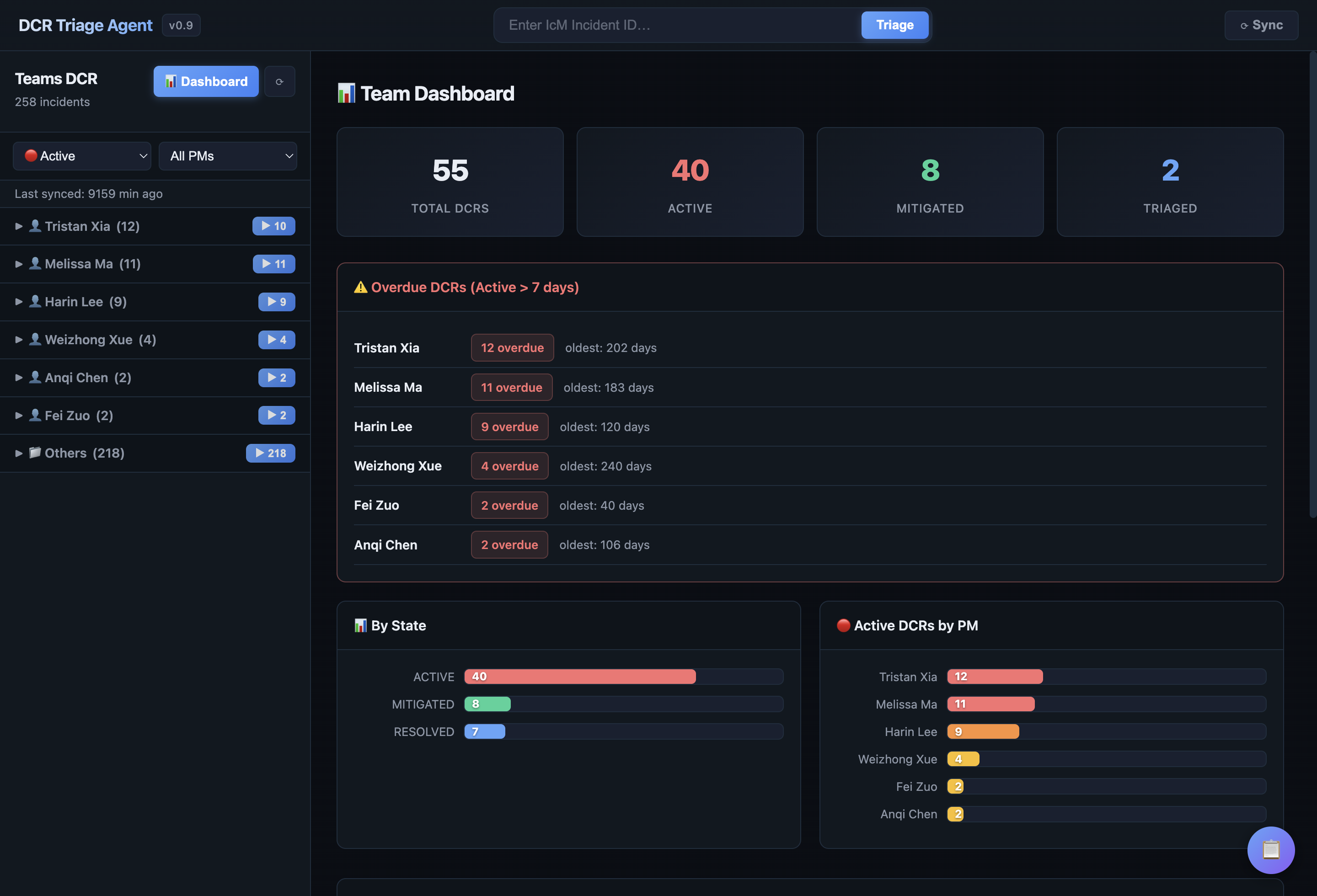
Team Dashboard: global stats + overdue alerts + PM workload
Result Visualization: Judgment Banner + Classification + Escalation scoring
PM Feedback Loop: Agree / Override β†’ record override rate β†’ continuous tuning
PM's daily entry point β€” review triage results, give feedback, collaborate
πŸ“₯ Input Layer
IcM Incident ID β†’ fetch DCR data in real time β†’ normalized input format
🧠 Reasoning Layer
4-layer progressive context β†’ CLI 7-step analysis β†’ Self-Eval supervision
πŸ“€ Output Layer
Classification + Dedup + Suggested Reply + Escalation β†’ mapped to IcM DCR Decision
♻️ Feedback Layer
PM Agree/Override β†’ record override rate β†’ ongoing prompt tuning

7-Step Triage Pipeline

Step 0 Safety Step 0b Quality Step 0c Owner Routing Step 1 Doc Precheck Step 2 Classify+Reply Step 3 Dedup Step 4-5 Escalate+Self-Eval
0
Safety Boundary Check
Sev0/1, S500/ACE + broad impact, compliance/legal/privacy β†’ forces PM Review
Rule Engine Β· No LLM
0b
Quality Precheck
Is the description sufficient? Missing customer symptoms? Severity reasonable? β†’ generate clarifying questions
Rule + LLM
0c
Ownership Routing
Based on PM β†’ Feature Area mapping, decide whether the assignee is correct
Keyword Match Β· No LLM
1
Documentation Precheck
"Is there existing documentation that already answers this?" β†’ search local / SharePoint
Knowledge Retrieval + LLM
2
Classification + Suggested Reply
β˜… Core step β€” progressive context injection β†’ 9 judgment types + PM-style reply draft
LLM Β· ContextAssembler
3
Duplicate / Similar Detection
IcM API + local cache compare against historical DCRs; strict core-ask matching prevents false positives
LLM Β· Similarity Scoring
4
Escalation Review
5-dimensional scoring β†’ auto-close / pm-review / escalate / safety-boundary
LLM Β· Weighted Scoring
2b
Self-Eval Supervision
Actor-Critic: a QA reviewer verifies judgment consistency β†’ PASS / DOWNGRADE / FAIL
LLM Β· Quality Calibration

9 Judgment Types & Context Engineering

βœ… Accepted
accept-backlog
Accepted into backlog, no ETA
accept-existing
Existing feature already addresses this
❌ Rejected
reject-by-design
Conflicts with product direction
reject-technical
Technically infeasible
non-dcr
Bug / regression / misunderstanding
close-no-response
Customer unresponsive
πŸ”„ Re-assign
re-assign
Outside this team's scope
Route to correct owner
⚠️ ≀10% β€” not a "safe default"
⏳ Pending
need-info
Insufficient info, needs clarification
discuss
Requires PM team discussion
⚠️ discuss ≀5%

4-Layer Progressive Context Injection (ContextAssembler)

🎯
Layer 0 β€” Role Identity Always injected
DCR triage assistant definition + judgment priority rules + recommending-language requirement
πŸ“
Layer 1 β€” Decision Rules Always injected
Full decision tree (Step 0-7) + 9 judgment definitions + anti-escalation / anti-evasion rules
πŸ‘€
Layer 2 β€” PM Profile On-demand (1-2 matches)
PM historical preferences + routing signals (Forms→Forms PM, recording permissions→ODSP)
⚠️
Layer 3 β€” Deep Context Conditional (only triggered by safety/compliance)
Safety boundary details + compliance guidance + cross-team decision authority + platform technical limits
Progressive injection saves ~45% tokens — only feed the LLM the knowledge this DCR actually needs

Portal Features at a Glance

FastAPI + single-page frontend, dark theme, zero-dependency vanilla JS

πŸ”
Smart Search & IcM Sync
Enter IcM Incident ID β†’ fetch data live β†’ auto-start the 7-step triage
Supports search modes: ID / title / assignee
πŸ“Š
Judgment Summary Banner
Prominent top banner showing DCR Decision + How Fixed + Judgment
Self-Eval status badge: βœ… PASS / ⚠️ DOWNGRADE / ❌ FAIL
πŸ’¬
Suggested Response Pinned
PM sees the suggested reply first, can copy & forward directly
9 PM-style templates + Support-Safe language guardrails
πŸ‘₯
Live Customer Info
S500 / CritSit / SR count / subscriptions / submitter
IcM API + disk cache, automatically flags high-priority customers
πŸ”—
IcM Direct Links
Each incident links straight to IcM Portal
Classification card auto-bolds keywords for emphasis
πŸ‘
PM Feedback Loop
Agree / Override buttons β†’ record override rate
Provides data for prompt tuning & continuous accuracy gains
πŸ’Ύ
Result Persistence
localStorage + server disk cache β†’ survives refresh
CLI triage results stay visible after reload
πŸ“ˆ
Analytics Dashboard
Bottom observability panel: CLI call count / token usage
Latency distribution / judgment distribution / confidence distribution
Typical workflow: Enter IcM ID β†’ one-click Triage β†’ review Judgment + Response β†’ Agree/Override β†’ done βœ…

πŸ–₯️ Product Demo β€” Core Views

PM daily workflow: from team-wide overview to single DCR triage — click image to view fullscreen
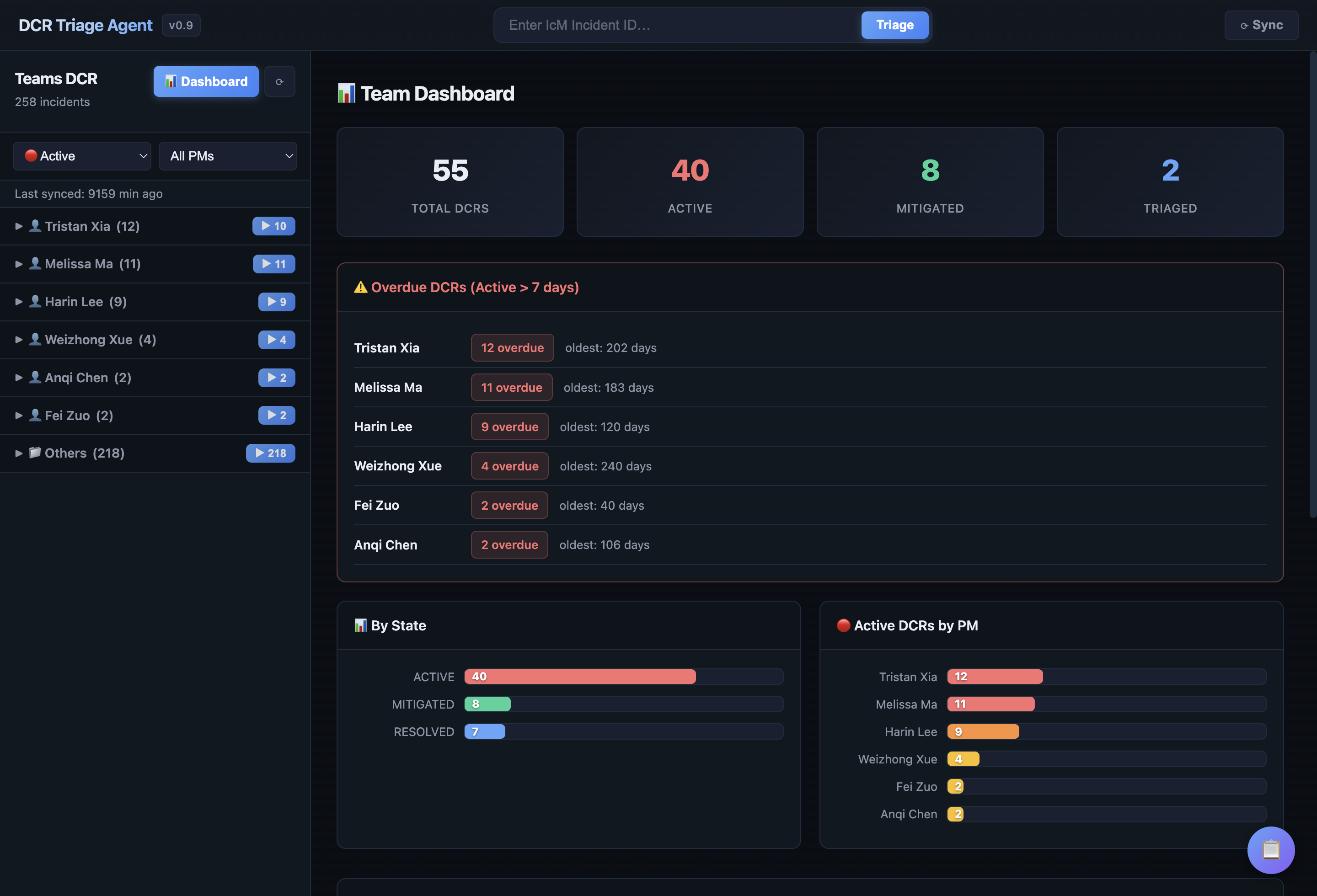
πŸ“Š Team Dashboard β€” Team-wide View
Team Dashboard
πŸ“ˆ Live Stats Panel
⚠️ Overdue Alerts
πŸ“Š Distribution Charts
πŸ‘₯ PM Filter
πŸ“ˆ Stats Panel Total / Active / Mitigated / Triaged  Β·  ⚠️ Overdue Alerts Aggregated by PM  Β·  πŸ“Š Charts State + PM workload
πŸ” One-Click Triage β€” Judgment + Suggested Response
Triage Detail
πŸ“‹ IcM Metadata
⚑ DCR Decision
βœ… Self-Eval
πŸ’¬ Suggested Reply
⚑ Triage Conclusion Decision + How Fixed  Β·  βœ… QA Self-Eval Pass / Downgrade / Fail  Β·  πŸ’¬ Suggested Reply copy & paste ready

πŸ–₯️ Product Demo β€” Classification & Dedup

AI-driven multi-dim classification, escalation review, and historical dedup — click image to view fullscreen
🏷️ Classification Decision β€” Classification + Escalation
Classification
🏷️ 5-Dim Classification
πŸ‘ PM Feedback
πŸ”Ί Escalation Score
🏷️ 5-Dim Type / Judgment / Impact / Urgency / Confidence  Β·  πŸ‘ Feedback Agree / Override  Β·  πŸ”Ί Escalation 1-5 score
πŸ”Ž Duplicate Detection β€” Safety Boundaries + Duplicate Check
Duplicate Check
πŸ›‘οΈ S500/ACE Detect
πŸ” Semantic Match
πŸ“ Final Verdict
πŸ›‘οΈ Safety Boundary S500 / ACE flag  Β·  πŸ” Semantic Match similarity % + diff explanation  Β·  πŸ“ Verdict <0.7 β†’ genuinely new request

πŸ“‹ DCR Decision Flow Overview

9 Judgment types β†’ mapped to 4 DCR Decisions (Accepted / Rejected / Re-assign / Pending) — click image to view fullscreen
πŸ“‹ DCR Triage Decision Flow β€” End-to-End Path from Intake to Decision
Decision Flow
πŸ€– System-Led Checks DCR validation β†’ info sufficiency β†’ team ownership β†’ existing solution match πŸ‘€ PM-Led Decision Product evaluation (reject-by-design / reject-technical / accept-backlog) βœ… Decision Output Accept β†’ write to IcM  |  Reject β†’ write to IcM  |  Pending β†’ awaiting PM discussion

Summary & Outlook

Delivered

πŸ—οΈ
7-Step Pipeline
Safety β†’ Quality β†’ Classify β†’ Dedup β†’ Reply β†’ Escalate β†’ Self-Eval
πŸ“
Context Engineering
4-layer progressive injection, ~45% token savings, on-demand PM Profile
πŸ”
Self-Eval Supervision
Actor-Critic architecture with PASS / DOWNGRADE / FAIL three-tier check
🌐
Portal Visualization
One-click triage + PM feedback loop + live customer info

Next Steps

πŸ“Š
Eval Framework
Build Gold Standard
Systematic accuracy measurement
🎯
Quality Gains
Drive answer quality & accuracy
from real PM feedback
πŸ€–
Teams Bot Integration
PMs receive triage suggestions
directly in Teams
🧩
CLI Skill Integration
Package the DCR knowledge base
as a CLI skill for reuse

Thank You — Questions Welcome

liuhanlin · Mentor: Fei Zuo · CMD SOX · Meeting Intelligence

×